Most e-commerce businesses don’t fail because of bad products; they fail because selling at scale demands infrastructure, capital, and logistics that most sellers simply don’t have.
India is one of the fastest-growing digital commerce markets in the world, yet the majority of sellers are still locked out of meaningful growth by high platform fees, complex onboarding, and limited distribution reach. That gap is exactly what Meesho was built to close.
Meesho recorded 251 million annual transacting users and ~846,000 annual transacting sellers in Q3 FY26 ended Dec 2025, making it India’s largest e-commerce platform by users and orders, according to its latest investor reports.
Meesho offers a low-barrier, scalable selling infrastructure that lets e-commerce businesses expand their reach without heavy upfront investment.
This guide breaks down the Meesho Supplier Panel in full, covering onboarding workflow, system functionality, and strategies to optimize your store’s performance.
What is Meesho Supplier Panel?
The Meesho Supplier Panel is the seller dashboard that lets you manage your entire Meesho store from one place. From listing products to receiving orders, tracking deliveries, and getting paid, everything happens here.
Think of it as the control room of your online business. Once you log in, you can see which products are live, which orders need to be packed, how much money is coming in, and how your store is performing in real time, without switching between apps, calling a courier, or maintaining a spreadsheet.
What Can You Sell on Meesho?
Meesho is an open marketplace, which means you can sell across a wide range of categories without needing a large inventory to get started. Whether you manufacture products, source from wholesalers, or resell, there is a category that fits, making it a great example of an online marketplace business model.
Here are some of the best-performing categories on Meesho in 2026:
- Clothing and Apparel: Sarees, kurtis, ethnic wear, and casual fashion consistently rank among the highest-selling categories on the platform.
- Home and Kitchen: Storage solutions, cookware, and home decor see strong and steady demand year-round.
- Fashion Accessories: Jewelry, handbags, belts, and scarves perform well because of low price points and high repeat purchases.
- Beauty and Personal Care: Skincare, hair care, and cosmetics are among the fastest growing categories as buyer preference shifts toward affordable self-care.
- Electronics and Gadgets: Mobile accessories and small appliances see high search volume and quick turnover.
If you are just starting out, pick a category you already have access to and focus on listing a few products well rather than uploading everything at once. Early traction comes from quality listings, not quantity.
Key Benefits of the Meesho Supplier Panel
Meesho is built to make selling online as simple and profitable as possible. Here is what you get as a supplier on the platform.
- Zero commission: Meesho charges 0% commission on all product categories, letting you keep your full earnings on every sale.
- Massive customer reach: Access millions of active buyers across India without spending on marketing or running your own storefront.
- No penalty on cancellations: You can cancel orders you can’t fulfill for unforeseen reasons without worrying about penalties.
- Built-in logistics: Meesho handles shipping and delivery through its own logistics network, so you don’t need to coordinate with multiple third-party logistics companies.
- Fast and secure payments: Your earnings are deposited directly into your bank account within 7 days of order delivery, including cash-on-delivery orders.
- Real-time order tracking: Get instant notifications on new orders, shipment updates, and returns all from one dashboard.
- AI-powered seller tools: The panel features advanced analytics, automated pricing suggestions, and better payment cycles, giving sellers more control over their earnings.
- Promotional tools: Run ads on your catalogs to boost product visibility and get more orders directly from the dashboard using smart ecommerce marketing strategies.
- Sell without GST: Meesho is open for sellers who don’t have a regular GSTIN, lowering the entry barrier for new businesses.
- Dedicated seller support: Raise support tickets directly from the panel for any issues related to orders, catalogues, or logistics and track their resolution in real time.
Meesho Supplier Panel Features Overview
| Feature | Function | Business Impact |
| Catalog Management | Upload and manage products | Improves product visibility |
| Inventory Tracking | Monitor stock levels | Reduces cancellations |
| Order Processing | Manage orders and returns | Enhances efficiency |
| Payment System | Track earnings and settlements | Ensures financial clarity |
| Analytics Dashboard | Performance insights | Supports growth strategy |
How Meesho Seller Registration Process Work?
Getting started on Meesho is quick and straightforward. Here is everything you need to do, step by step.
Documents You Need Before You Start
Keep these ready before you begin, so the process does not get interrupted midway.
- Business name, type, and address
- GSTIN for tax compliance
- PAN card for identity verification
- Bank account number and IFSC code
- Mobile number and email address for verification
Step 1: Visit the Meesho Supplier Portal
Go to supplier.meesho.com and click on Start Selling to begin your registration.
Step 2: Create Your Account
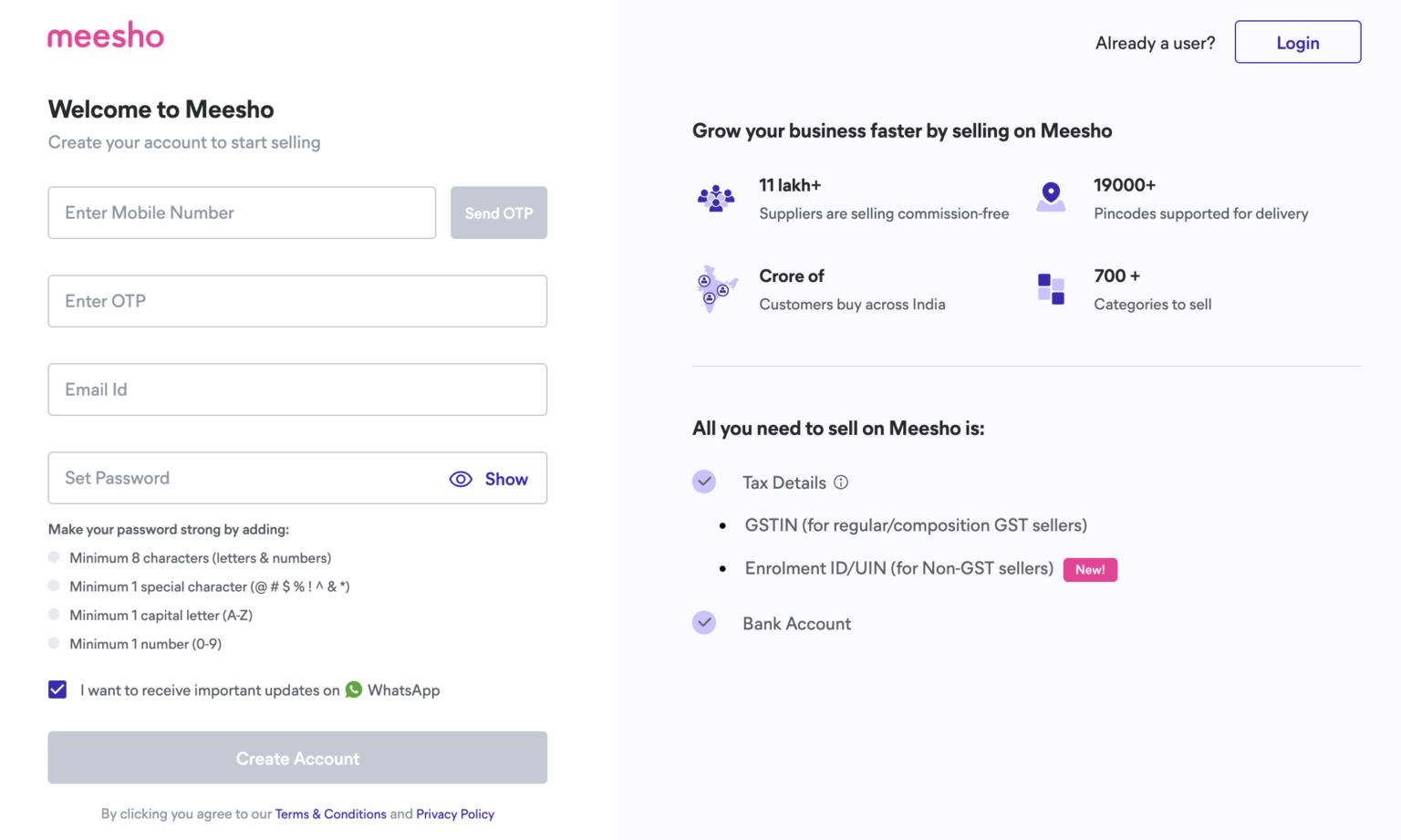
Enter your mobile number and click Send OTP. Once you receive the OTP, enter it to verify your number. Then add your business email and set a strong password to secure your account.
Step 3: Enter Your Business and Tax Details
Add your GSTIN and click Verify. Fill in your pickup address and bank account details so Meesho can process your payments.
Step 4: Review and Submit
Go through all the information you have entered, agree to the terms and conditions, and submit your application.
Step 5: Wait for Verification
Meesho will review your application within a few days. You will get a notification once your account is activated and ready to use.
Step 6: Set Up Your Seller Profile
Log in to your Supplier Panel and start setting up your store. Upload your products with clear images and descriptions, set your prices, and you are ready to start selling.
How to Log In to Meesho Supplier Panel
Once registered, logging in takes less than a minute.
Step 1: Go to supplier.meesho.com and enter your registered mobile number or email and password.
Step 2: Click Login and enter the OTP sent to your mobile or email to verify your identity.
Step 3: You will land directly on your seller dashboard, where you can manage orders, listings, inventory, and payments.
If you ever forget your password, click Forgot Password on the login page and follow the steps to reset it using your registered email or phone number.
How to Add Products on Meesho Supplier Panel
Your catalogue is what gets you sales. A well-listed product with the right details and images will always outperform a poorly listed one, no matter how good the product is. Here is how to do it right.
Step 1: Go to Catalogue Upload
From your dashboard, click on Catalogue Upload. This is where all your product listings are created and managed.
Step 2: Choose How You Want to Upload
Meesho offers two options based on how many products you are adding.
- Single catalogue: Best when you are adding one product at a time or testing a new item before going all in.
- Bulk catalogue upload: Use this when you have multiple products ready. Download the category-specific template, fill in the details, and upload the file in one go.
Step 3: Upload Your Product Images
This is the most important part of your listing. Buyers cannot touch or try your product, so your images do the selling. Upload high-resolution photos from multiple angles and make sure the background is clean and distraction-free.
Step 4: Fill in Your Product Details
Get this right, and your listing will rank better and convert more buyers.
- Title: Keep it clear and descriptive. Include the product type, key feature, and size or color if relevant.
- Description: Explain what the product is, who it is for, and why someone should buy it. Answer the questions a buyer would ask before purchasing.
- Price: Research what similar products are selling for and price competitively without cutting into your margins.
- Category and attributes: Select the most accurate category so your product reaches the right buyers.
Step 5: Submit and Track Approval
Once everything looks good, click Submit Catalogue. Meesho will review your listing and notify you once it goes live. You can track the approval status directly from your dashboard.
Tips for Successful Product Listing
- Avoid vague titles like “Women Kurti.” Be specific “Cotton Printed A-Line Kurti for Women” will always perform better.
- Write descriptions for the buyer, not for yourself. Focus on fit, material, use case, and care instructions.
- Refresh your catalogue regularly. Stale listings with no updates tend to rank lower over time.
- If a product is not selling, revisit the images and title first before changing the price.
These strategies are part of effective ecommerce product management, which directly impacts your product rankings and sales.
Catalogue Optimization Checklist
| Element | Best Practice | Impact |
| Title | Include primary keywords | Improves search ranking |
| Description | Add features and specifications | Increases conversions |
| Images | Use high-resolution visuals | Builds trust |
| Pricing | Competitive and optimized | Boosts sales |
| Category | Accurate classification | Enhances discoverability |
How to Manage Orders and Inventory on Meesho Supplier Panel
- Accept orders on time: Go to the Orders tab, review pending orders, and confirm the ones you can fulfill. Use filters to spot urgent orders nearing their dispatch deadlines and prioritize them first.
- Pack and ship correctly: Once accepted, pack the product securely in plain packaging with no external branding, download the shipping label from the panel, attach it to the package, and mark it Ready to Ship.
- Keep cancellations low: Only accept orders you can fulfill. Frequent cancellations affect the seller’s rating and reduce visibility on the platform.
- Update inventory in real time: As soon as a product goes out of stock, update its status in the catalog. Leaving inactive listings live results in cancellations, which directly hurt the seller’s score.
- Use data to restock smarter: Check the analytics section regularly to see which products are selling fast and which are not moving. Restock based on actual demand so capital is never tied up in slow-moving inventory.
Grow Your Business with Meesho Supplier Panel
The Meesho Supplier Panel gives you everything you need to start and grow an online business without heavy investment or complex setup. But the platform is only as powerful as the effort you put into it.
Sellers who win on Meesho are not the ones who simply register and wait. They keep their catalogues updated, price competitively, fulfill orders on time, and use their dashboard data to make smarter decisions every week.
Start strong, optimize regularly, and treat every listing and every order as an opportunity to build a better seller score. That consistency is what drives long-term growth on the platform.